
Verifying a sending domain
The exact DNS records Peleka needs, plus how domain warmup works.
Adding a domain
From Settings → Domains, click Add a sending domain. The setup wizard is two steps:
1. Enter your domain
Both root domains (yourbrand.com) and subdomains (mail.yourbrand.com) work. You'll also be asked: "Have you sent marketing/newsletter emails from this domain before?", with three choices: Yes, regularly / Occasionally / This is a brand-new sending domain. Your answer determines which warmup track you start on (see below), so answer honestly rather than optimistically.
2. Add the DNS records
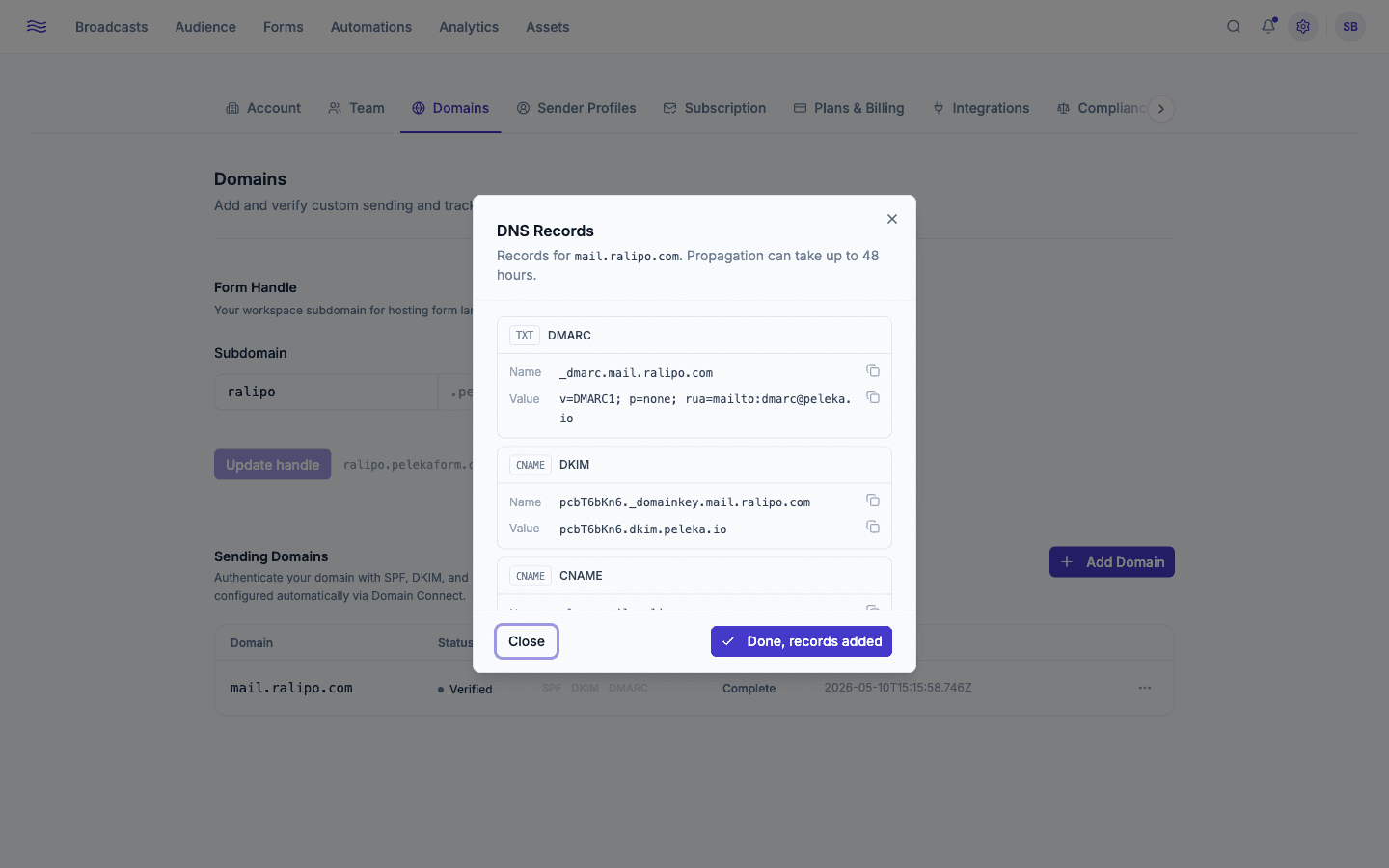
If your registrar supports Domain Connect, Peleka offers a one-click "Connect with [Provider]" button that applies the records for you via a popup approval; look for a manual fallback link if your provider isn't supported. Otherwise, add these three records manually at your DNS provider:
| Type | Host | Value | Purpose |
|---|---|---|---|
| TXT | _dmarc.<yourdomain> | v=DMARC1; p=none; rua=mailto:[email protected] | DMARC policy |
| CNAME | <selector>._domainkey.<yourdomain> | <selector>.dkim.peleka.io | DKIM signing |
| CNAME | plesp.<yourdomain> | mailfrom.peleka.io | Custom envelope/MAIL FROM domain |
The exact selector value is shown in your dashboard when you add the domain. Copy it directly from there rather than retyping it.
Cloudflare users
Domain Connect's one-click flow has a known quirk with Cloudflare (it doesn't round-trip a parameter the spec expects). If the one-click button doesn't complete cleanly on a Cloudflare-managed domain, use the manual DNS records instead; it's just as fast.
Verification
A background check re-polls your DNS every 10 minutes for up to 72 hours. A domain is marked Verified once all three are confirmed: domain ownership, DKIM, and the MAIL FROM CNAME. (DMARC is detected and shown, but isn't required for verification. You should still add it, since it's what protects your domain from being spoofed by anyone else.)
- Pending: waiting on DNS propagation. This is normal for up to 48 hours after adding records, occasionally longer depending on your registrar's TTL.
- Verified: ready to send.
- Failed: 72 hours passed without confirming every required record. Peleka tells you specifically which record(s) it couldn't find. Fix them and click Retry to re-run the check without starting over.
Held for review
Every new domain also goes through an automated risk/compliance check in parallel with DNS verification. If DNS verifies before that check clears, you'll see "Domain held for review": sending is paused until a Peleka team member approves it, which is usually resolved within one business day. Email [email protected] if it's taking longer.
Domain warmup
Once verified (and approved, if it was flagged for review), every domain automatically enters a warmup program: a deliberate ramp in sending volume that builds trust with inbox providers before you're allowed to send at full volume.
Your track is set from your answer in step 1. A domain you've already sent marketing email from regularly ramps up fastest, an "occasional" sender takes a moderate path, and a brand-new domain starts slowest and takes the longest to reach full volume. Each track raises your daily sending limit in stages over a period of days before lifting the cap entirely.
Each phase also has its own bounce/complaint thresholds to advance; your exact daily caps and thresholds are shown in your warmup status modal, reachable from the domain's row in Settings → Domains.
Warmup can pause itself
If bounce rate exceeds 5%, hard-bounce rate exceeds 3%, or complaint rate exceeds 0.3% on a domain (checked continuously, not just at day boundaries), warmup pauses automatically, and a high bounce rate can also demote you to a slower track. Sending is blocked until a Peleka admin reviews and resumes it. This is the single best reason to only ever import contacts who've genuinely opted in: see Importing contacts.
Ongoing health checks
Verified domains are re-checked roughly weekly (and sooner, with a 24-hour cooldown, right after a bounce or complaint signal) to catch DNS regressions, for example if a DKIM CNAME gets accidentally removed during an unrelated DNS cleanup. A regression triggers an in-app notification so you can fix it before it affects deliverability broadly.
Removing a domain
Deleting a domain from Peleka does not remove the DNS records from your registrar. You'll need to clean those up there yourself if you're retiring the domain entirely.